🛰️ Threat Intel Aggregation & IOC Enrichment Pipeline#
Executive Summary#
This project is a Blue Team threat intelligence pipeline that turns raw open-source CTI feeds into actionable Wazuh detections. It ingests indicators of compromise from URLhaus, Feodo Tracker, and AlienVault OTX, normalizes them into a unified schema, deduplicates repeated indicators, calculates confidence scores, enriches high-confidence IOCs with AbuseIPDB and VirusTotal, and exports the final IP/domain indicators into Wazuh CDB lookup lists.
The main purpose is to bridge the gap between “threat intelligence as data” and “threat intelligence as detection.” A CSV feed or API response is useful, but it does not protect an environment by itself. The value comes when those indicators are filtered, scored, operationalized, and loaded into a SIEM where they can match real logs and generate alerts.
Problem Statement#
Open-source CTI feeds are easy to collect but difficult to use directly. They often contain different schemas, inconsistent field names, overlapping data, stale indicators, and noisy community-submitted entries. Sending every raw IOC directly into a SIEM creates alert fatigue and can waste API quota during enrichment.
This pipeline addresses those issues by adding engineering controls between feed collection and detection:
- Normalize different feed formats into one IOC model.
- Deduplicate repeated values by
valueandtype. - Track source corroboration with
hit_count. - Score indicators before enrichment or export.
- Enrich only high-confidence indicators.
- Export actionable indicators into Wazuh CDB lists.
- Automate the workflow with a systemd user timer.
Architecture Overview#
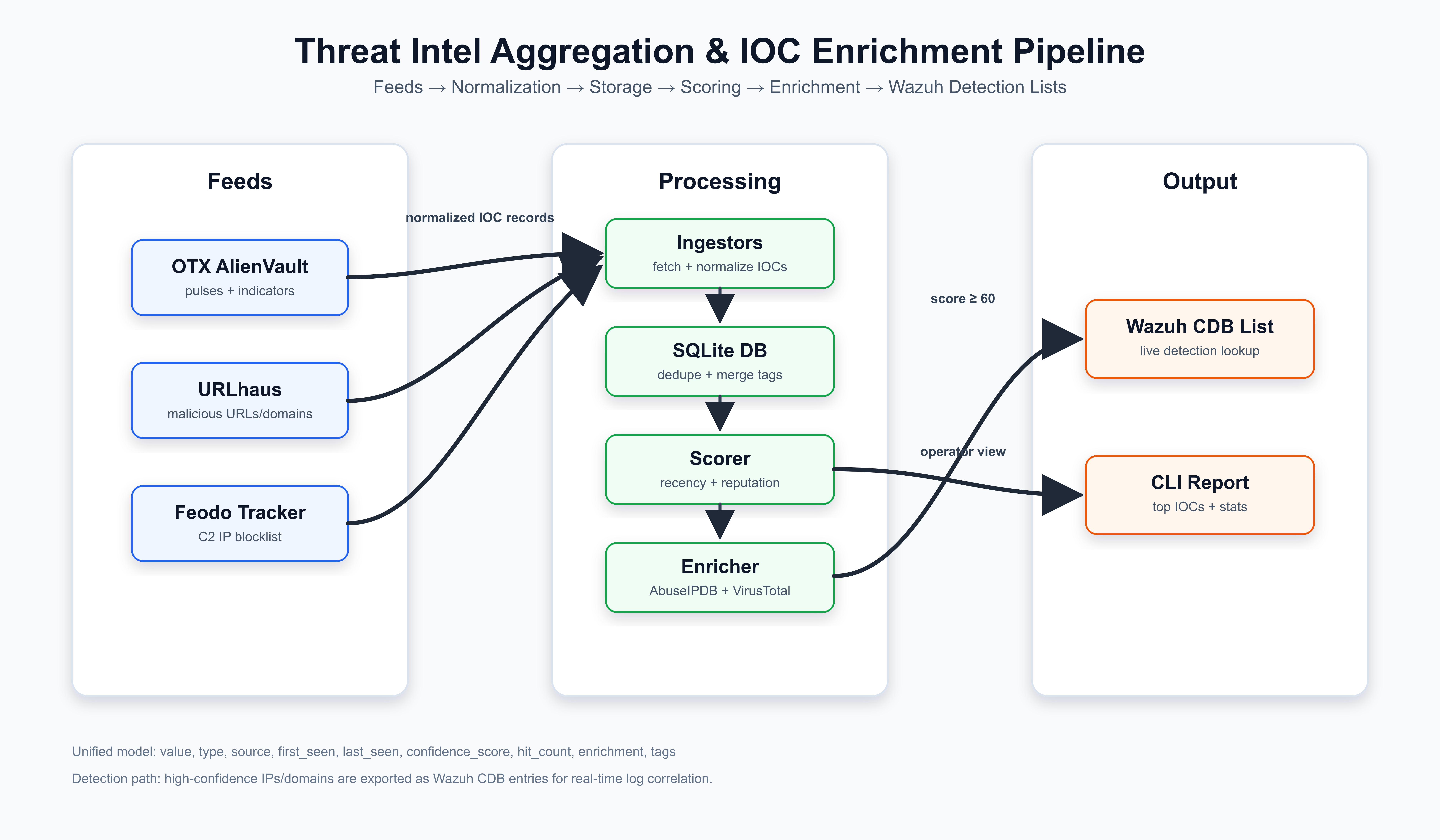
The architecture is split into independent stages:
- Feed ingestion pulls raw data from external CTI sources.
- Normalization converts each feed’s native format into the shared IOC model.
- SQLite storage deduplicates indicators and preserves operational metadata.
- Scoring ranks IOCs by recency, source trust, and corroboration.
- Enrichment adds AbuseIPDB, VirusTotal, WHOIS, and ASN context.
- Wazuh export writes high-confidence IP/domain indicators to CDB list files.
- Wazuh rules match decoded log fields against those CDB lists.
This design keeps responsibilities separated. A feed parser can change without touching scoring. A scoring rule can change without touching Wazuh export. A new enrichment provider can be added without changing the database schema because enrichment data is stored as JSON.
IOC Data Model#
Every feed is normalized into the same structure:
| Field | Purpose |
|---|---|
value | IOC value such as an IP, domain, URL, or hash |
type | IOC type: ip, domain, url, or hash |
source | Feed source such as urlhaus, feodo, or otx |
first_seen | Earliest known timestamp |
last_seen | Most recent observation timestamp |
confidence_score | Pipeline-calculated score from 0 to 100 |
hit_count | Number of unique feed sources that observed the IOC |
enrichment | JSON blob containing API enrichment results |
tags | Malware family, campaign, pulse tag, or feed label metadata |
The important engineering choice is the uniqueness constraint:
UNIQUE(value, type)
This prevents duplicate feed entries from creating duplicate database rows.
When the same IOC appears again, the pipeline updates metadata instead of
replacing the record. This preserves first_seen, updates last_seen, merges
tags, merges sources, and recalculates hit_count.
Feed Ingestion#
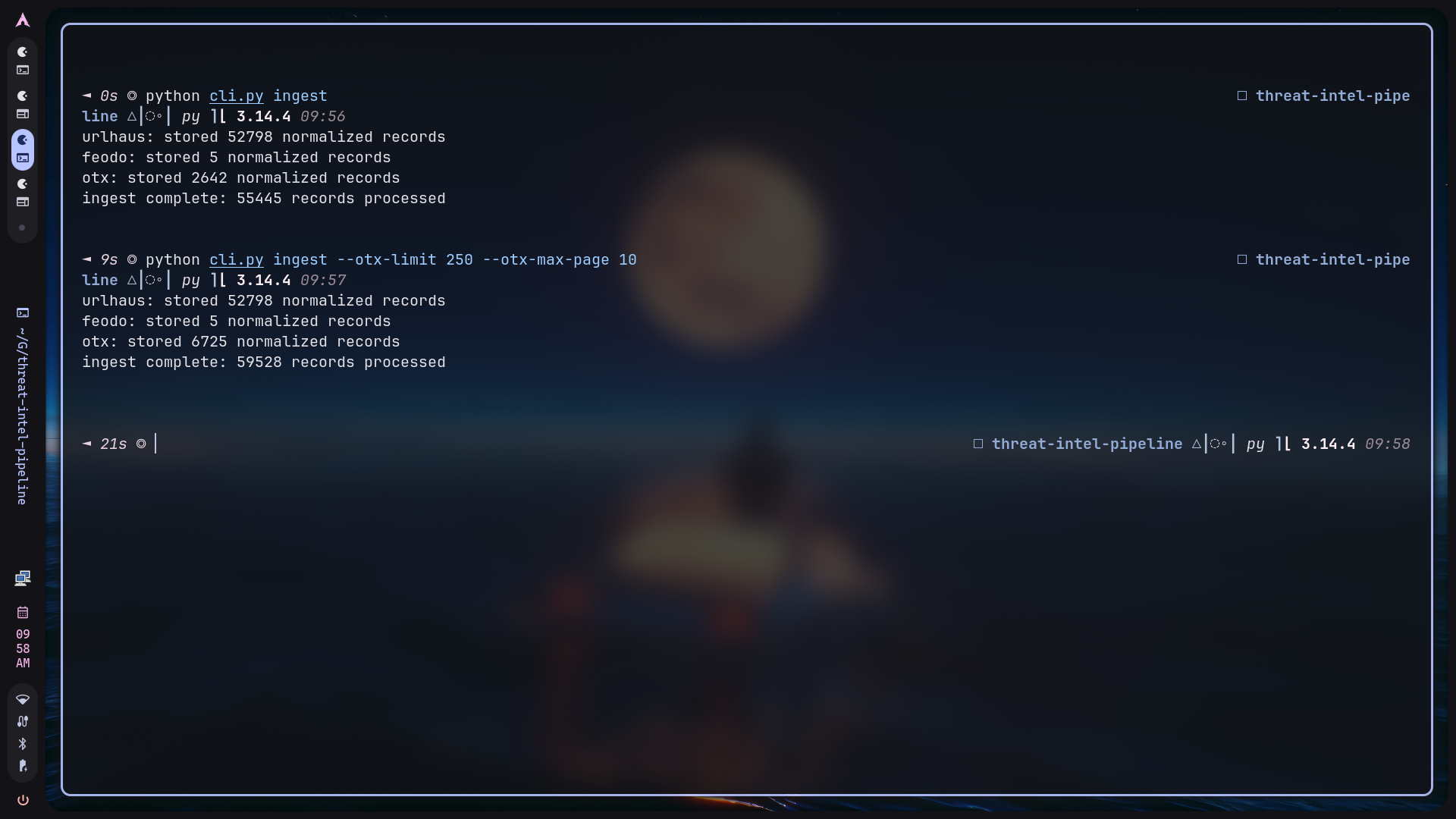
The project currently supports three feed sources:
| Feed | Indicator Types | Notes |
|---|---|---|
| URLhaus | URLs, domains, IPs | Recent malicious URLs and derived host indicators |
| Feodo Tracker | IPs | Curated C2 IP blocklist |
| AlienVault OTX | IPs, domains, URLs, hashes | Community pulse indicators |
Each feed has a dedicated ingestor class. This is intentional: feed parsing is usually the least stable part of a CTI pipeline because providers change CSV headers, API parameters, or field names over time. Keeping each parser isolated makes those changes easier to fix without affecting other stages.
URLhaus required special parsing because its CSV header is commented out with a
leading #. The ingestor extracts that header, parses the remaining CSV rows,
stores the full URL, and derives a host indicator from the URL. If the host is
an IP address, it is stored as type=ip; otherwise it is stored as
type=domain.
OTX ingestion is intentionally tunable:
python cli.py ingest --otx-limit 100 --otx-max-page 5
This is useful because OTX can be slow or large depending on the subscribed pulses. For screenshot/demo work, the limit can be reduced. For deeper pulls, the page and item limits can be raised.
Storage and Feed Health#
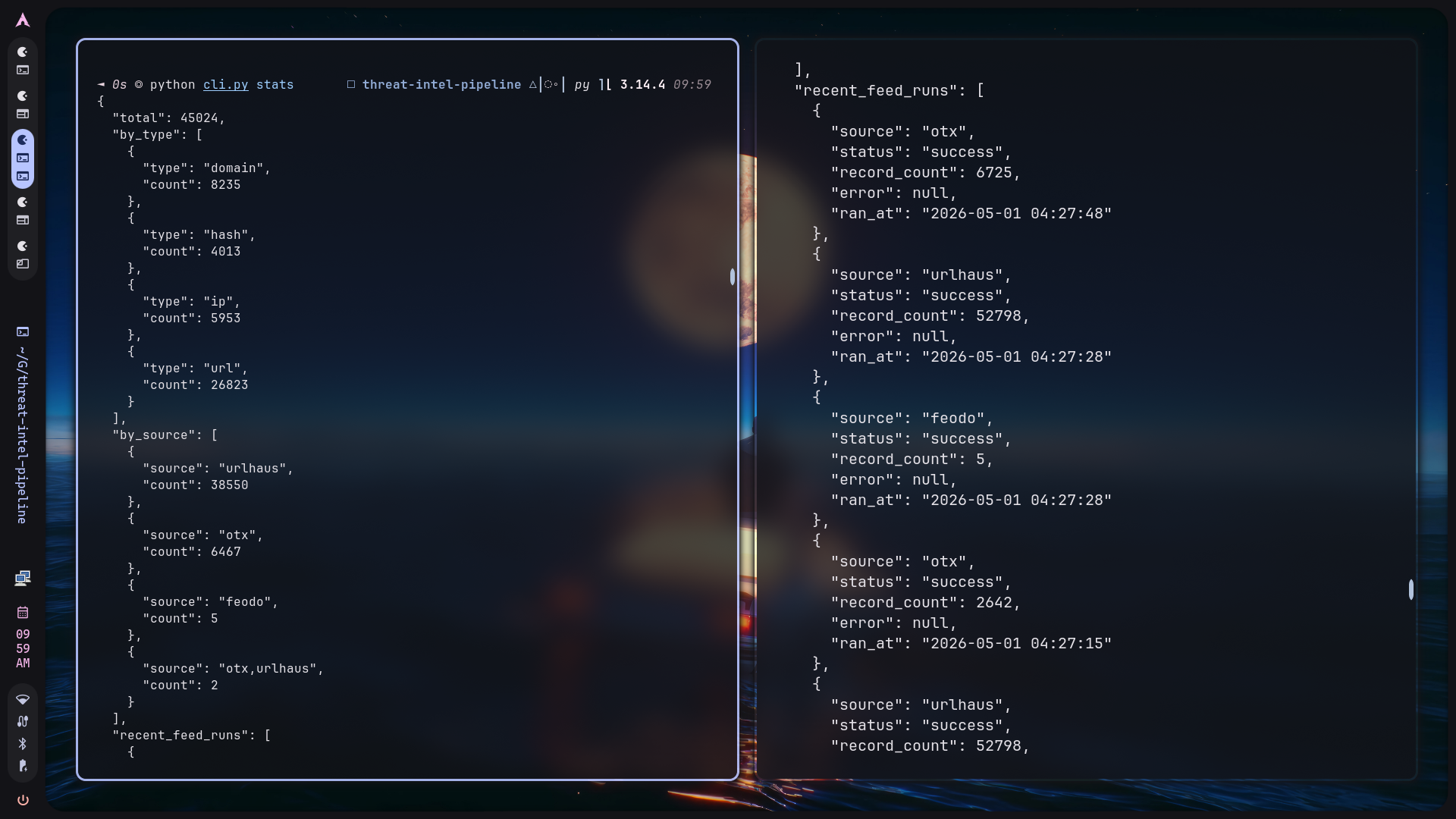
SQLite was chosen because this project is intended to run anywhere without additional infrastructure. It provides enough durability, queryability, and schema control for an analyst workstation or lab Wazuh deployment.
The database stores both IOCs and feed run history. Feed run logging matters
because CTI pipelines can fail partially. URLhaus might work while OTX is down,
or an API key might expire while Feodo continues to ingest successfully. The
stats command gives quick visibility into:
- total IOC count,
- IOC type distribution,
- source distribution,
- recent feed run success/failure status.
The storage layer also uses a SQLite busy timeout and WAL fallback handling to reduce failures when the CLI, timer, or manual queries overlap.
Deduplication and Corroboration#
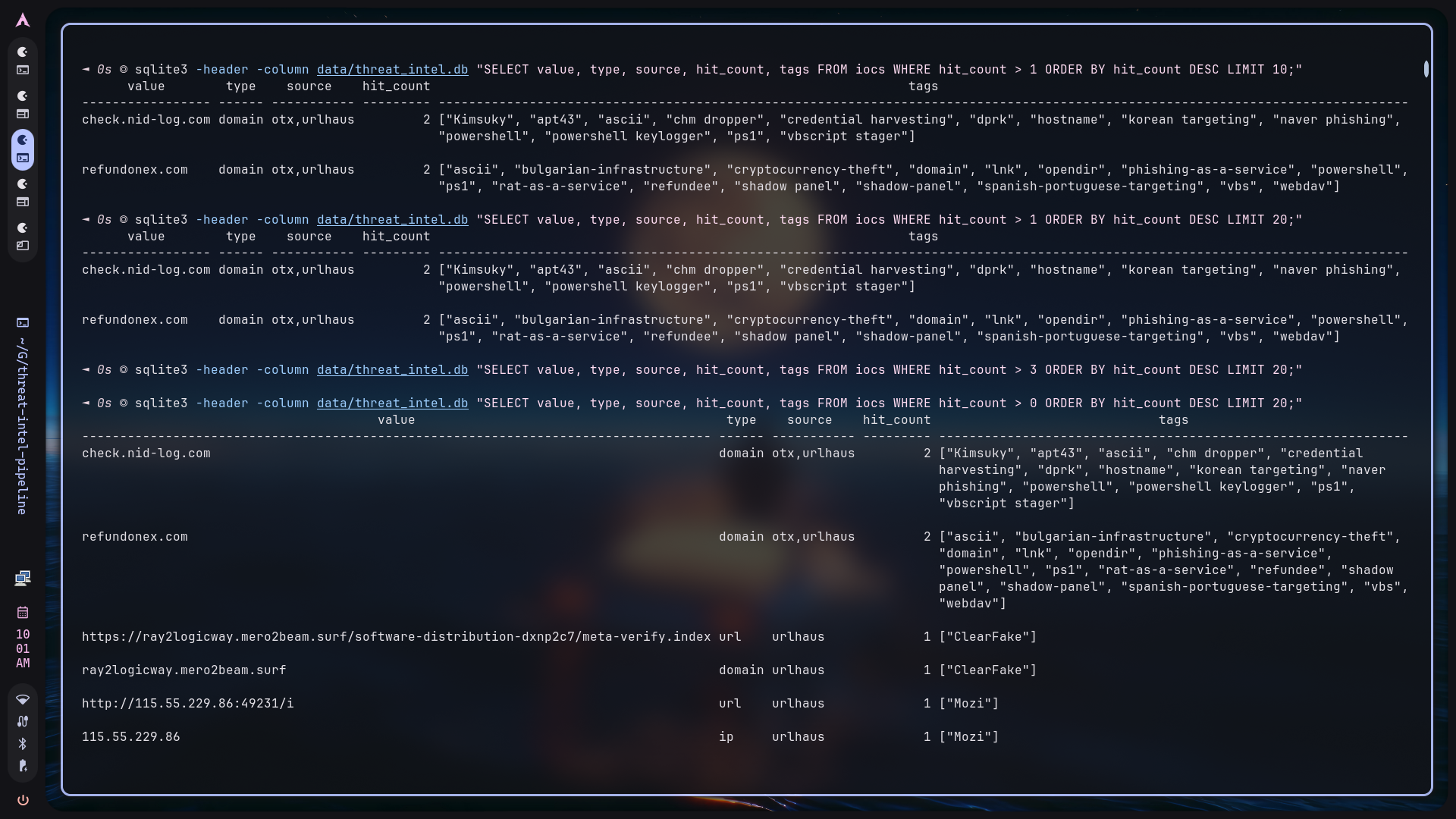
Deduplication is more than a storage optimization. It directly affects scoring.
An IOC that appears in multiple sources is stronger than an IOC seen in only
one source. The pipeline records this using merged source values and
hit_count.
Example logic:
- First observation:
source=urlhaus,hit_count=1 - Later seen in OTX:
source=otx,urlhaus,hit_count=2 - Tags from both feeds are merged into the same IOC row
This allows the confidence engine to use corroboration as a scoring factor without needing to query raw feed tables.
Confidence Scoring#
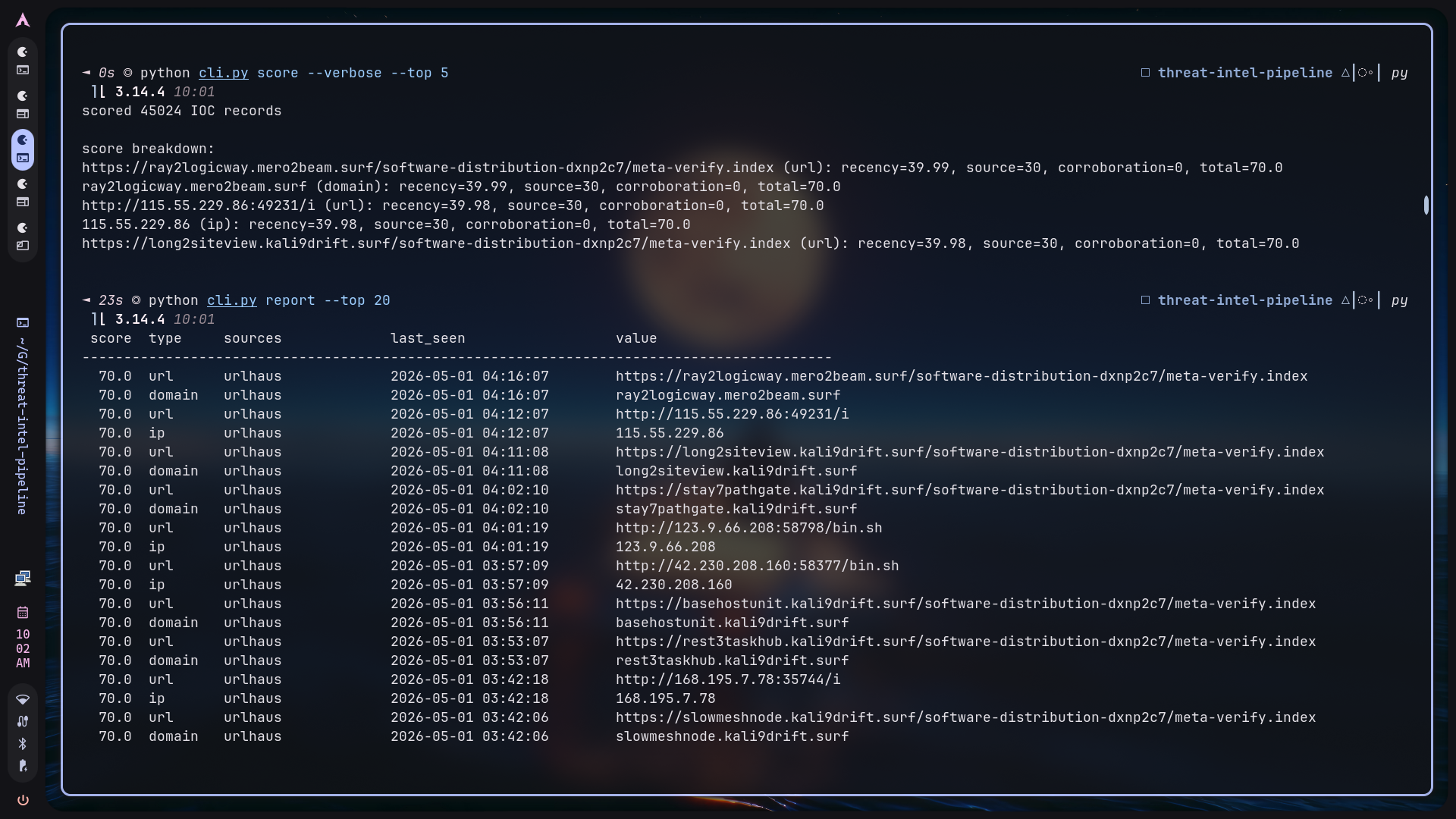
The confidence score is calculated from three factors:
| Factor | Max Points | Reason |
|---|---|---|
| Recency | 40 | Recent infrastructure is more actionable |
| Source reputation | 35 | Curated feeds should carry more trust |
| Cross-feed corroboration | 25 | Multi-source sightings are stronger signal |
Source reputation weights:
| Source | Weight |
|---|---|
| Feodo Tracker | 35 |
| URLhaus | 30 |
| OTX | 20 |
The final score is capped at 100. Only IOCs scoring at or above the configured
threshold, default 60, proceed to enrichment and Wazuh export.
This scoring model is intentionally simple and explainable. In detection engineering, a transparent score is often more useful than an opaque model because analysts need to understand why an IOC became actionable.
Enrichment Strategy#
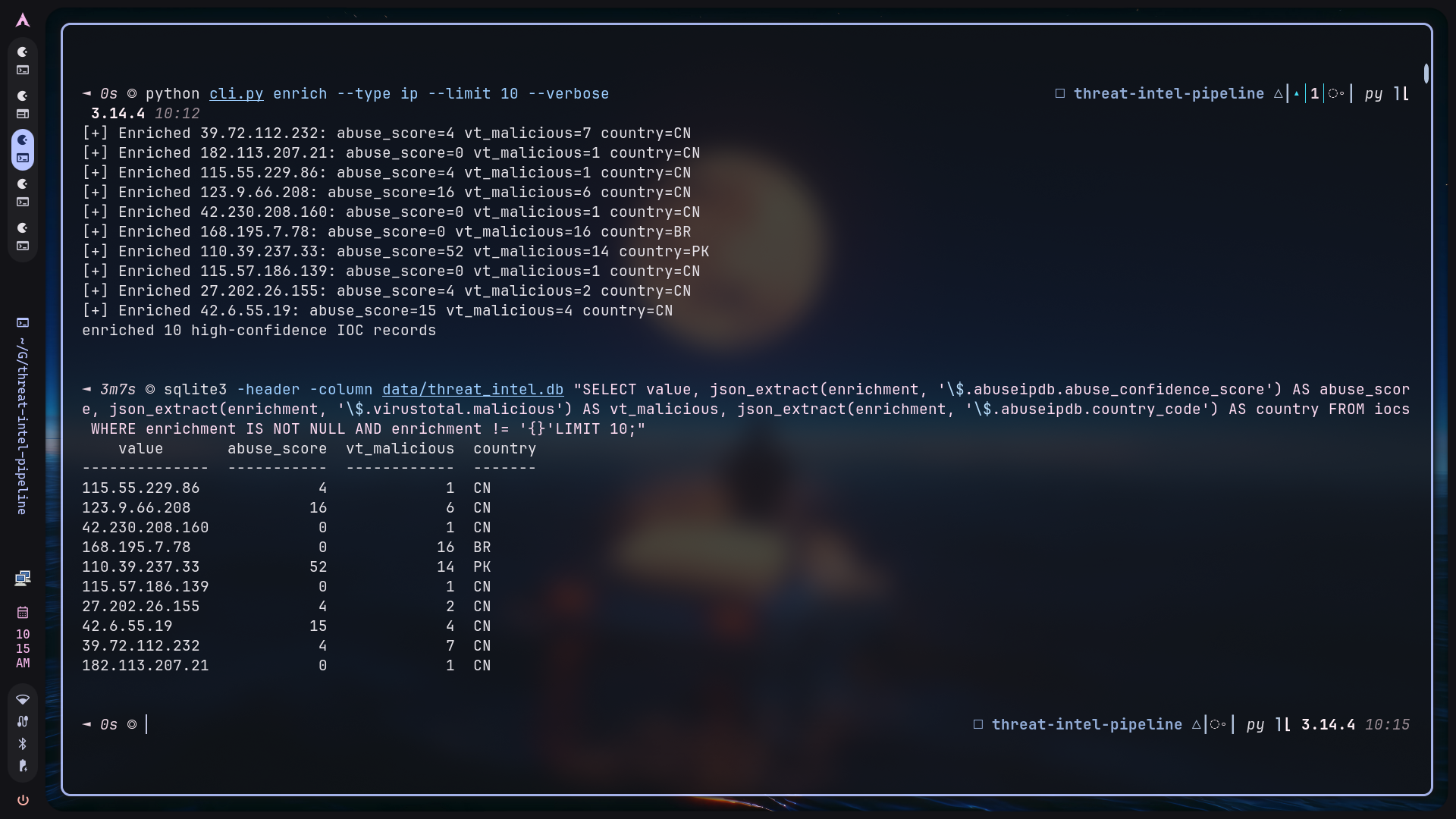
Enrichment is rate-limit-aware and selective. The pipeline does not enrich every IOC because free-tier APIs are limited and low-confidence indicators can waste quota.
Enrichment sources:
| Provider | IOC Types | Data Added |
|---|---|---|
| AbuseIPDB | IP | abuse score, country, ISP, usage type |
| VirusTotal | IP, domain, URL, hash | malicious/suspicious counts, reputation |
| ipwhois / RDAP | IP | ASN, organization, country, network |
| python-whois | Domain | registrar and registration metadata |
The enrichment data is stored in the enrichment column as JSON. This avoids
schema churn when API responses change and keeps the original context available
for reporting.
Verbose enrichment output was added for screenshot and operator visibility:
[+] Enriched 115.55.229.86: abuse_score=4 vt_malicious=1 country=CN
Wazuh CDB Export#
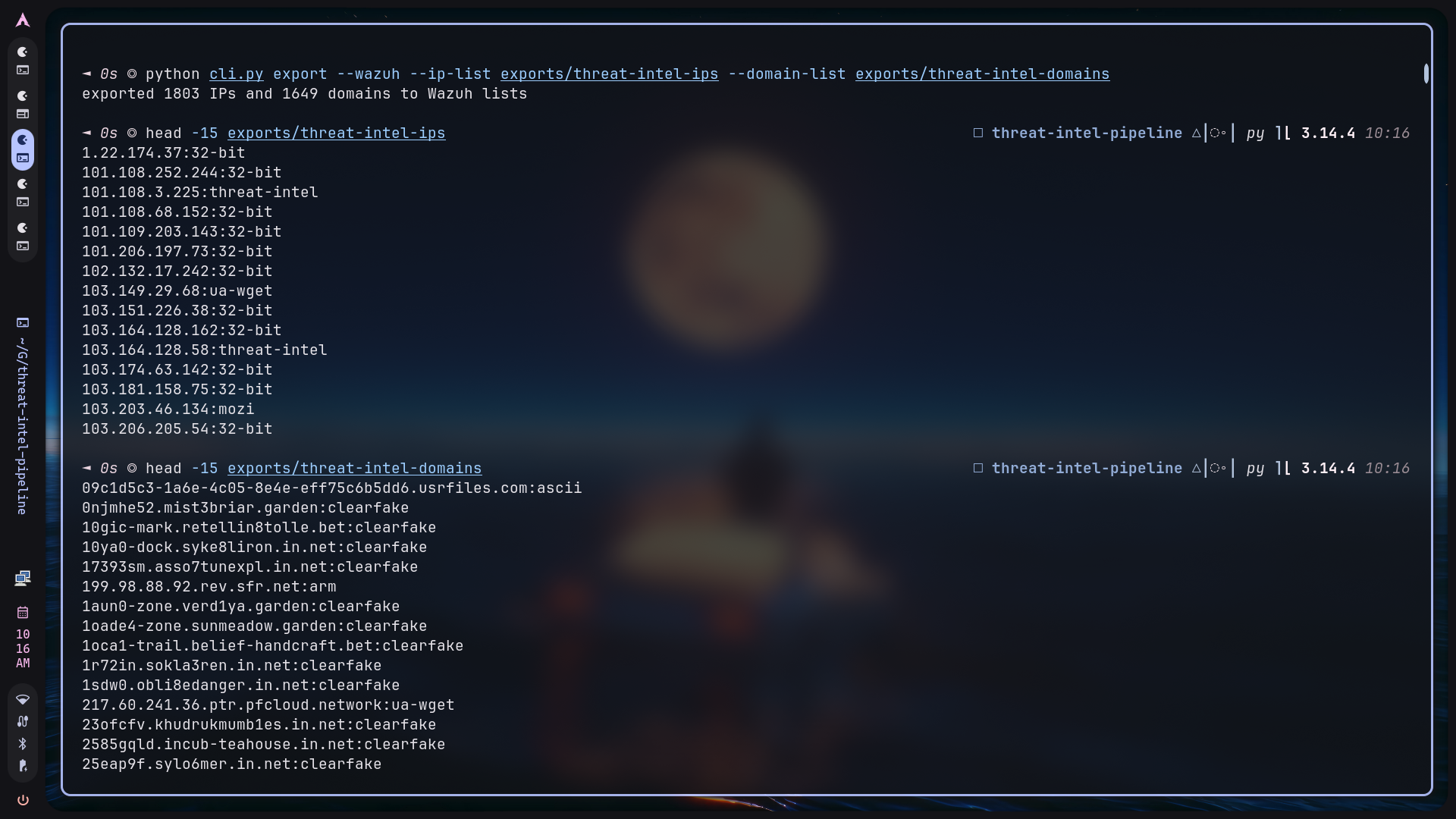
Wazuh CDB lists use a simple key/value format:
1.2.3.4:malware-c2
evil.example:botnet
The exporter queries high-confidence IPs and domains and writes two separate lists:
threat-intel-ipsthreat-intel-domains
For Docker-based Wazuh, the pipeline exports locally first:
python cli.py export --wazuh \
  --ip-list exports/threat-intel-ips \
  --domain-list exports/threat-intel-domains
Those files are then copied into the Wazuh manager container. This avoids
assuming that /var/ossec exists on the host.
The exporter also guards against stale database rows by routing IP-looking values into the IP list even if an older row was incorrectly typed as a domain.
Wazuh Rule Logic#
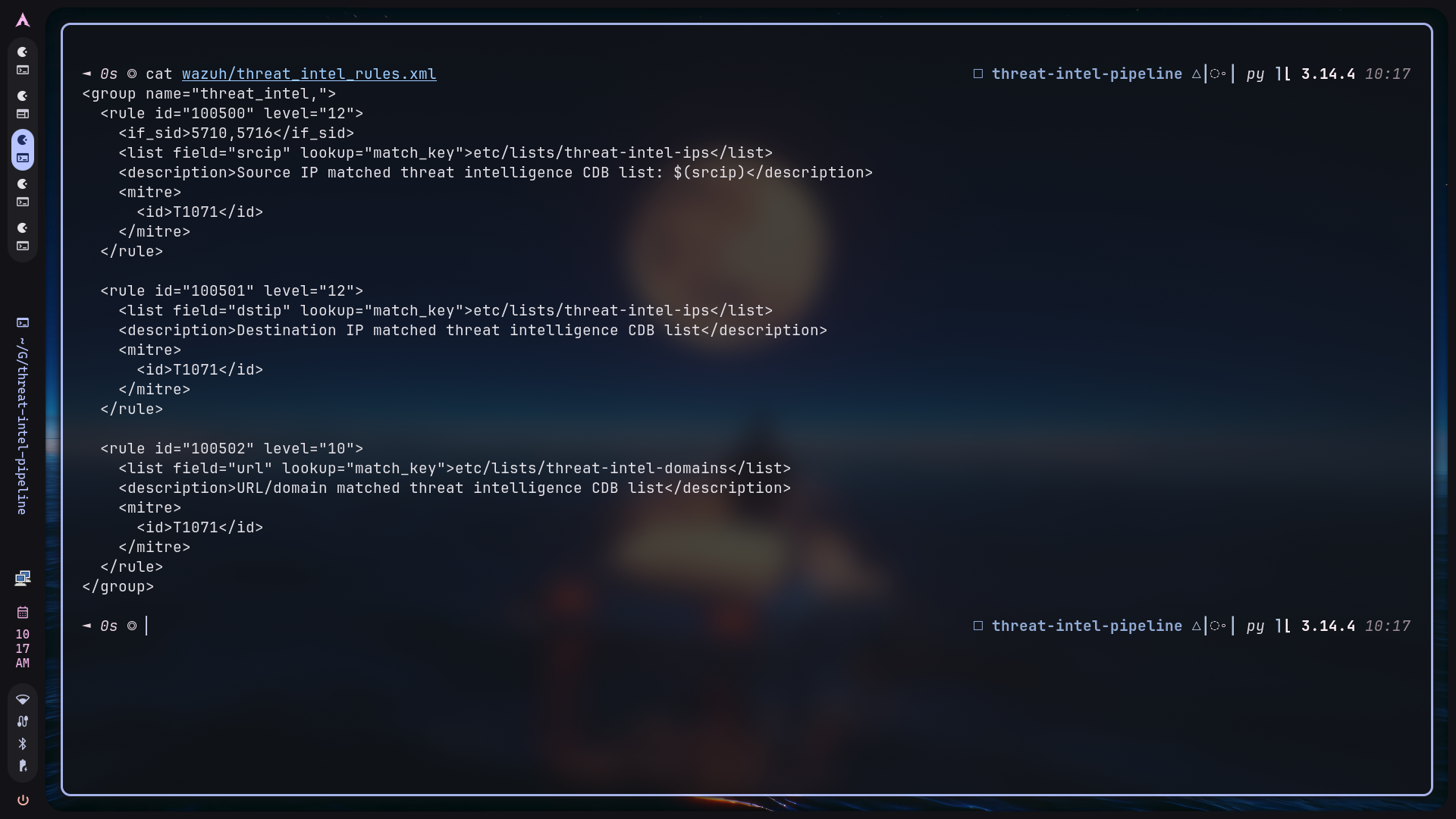
The custom Wazuh rule checks decoded log fields against the threat-intel CDB
lists. For SSH events, the rule uses Wazuh’s built-in SSH decoding first, then
matches srcip against the exported IP list.
The important rule detail is the parent rule condition:
<if_sid>5710,5716</if_sid>
This ensures the threat-intel rule is evaluated after Wazuh has decoded the SSH
event and extracted srcip. Without a parent rule, Wazuh may not evaluate the
list lookup in the expected context.
The custom alert is high severity:
rule.id: 100500
rule.level: 12
description: Source IP matched threat intelligence CDB list: $(srcip)
Docker-Based Wazuh Deployment#
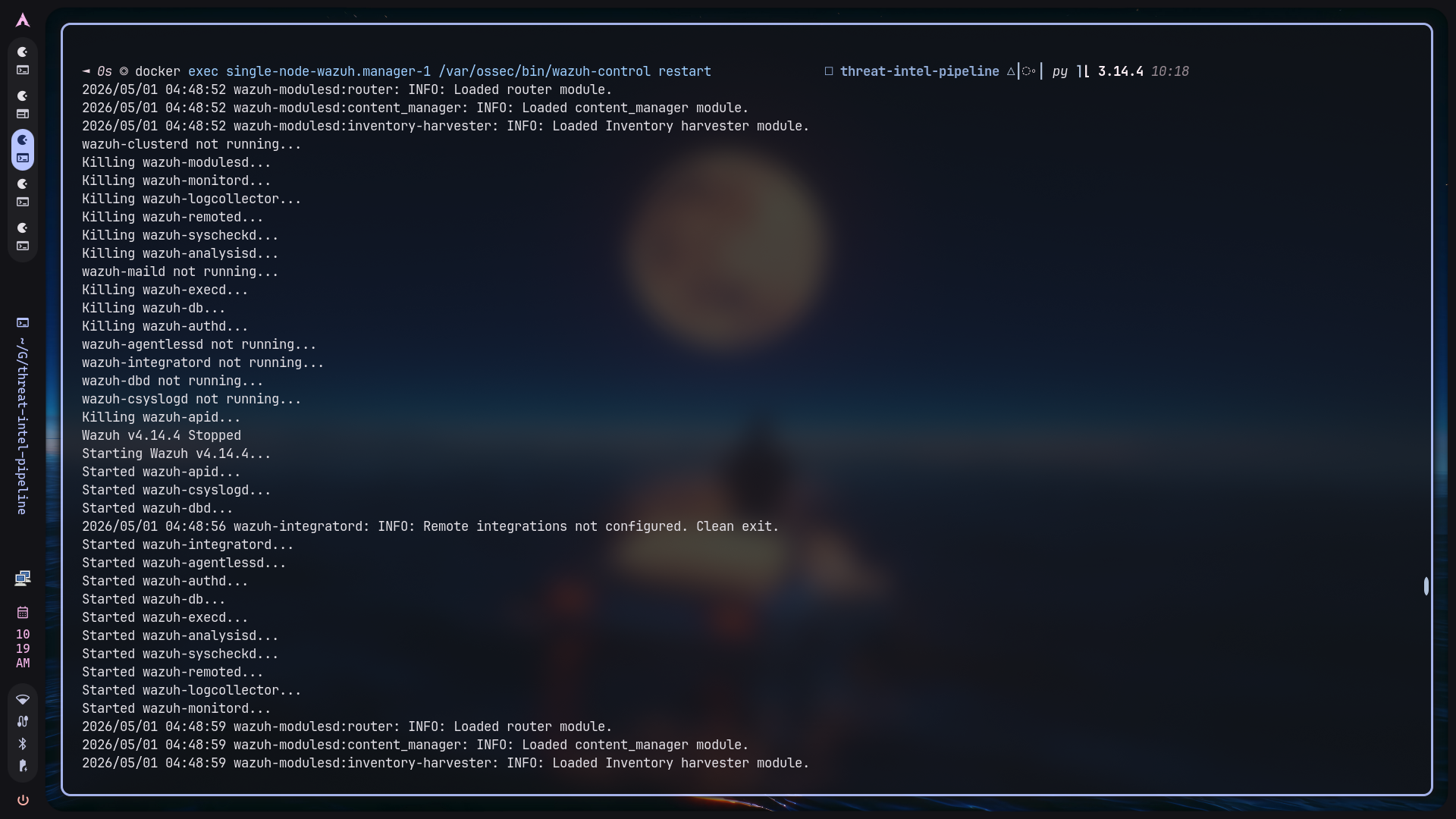
The Wazuh deployment used for this project runs in Docker. That changes the deployment model:
- CDB lists must be copied into the manager container.
- Custom rules must be copied into
/var/ossec/etc/rules/. - CDB list paths must be registered in
/var/ossec/etc/ossec.conf. - The Wazuh manager must be restarted after changes.
The Docker workflow:
docker cp exports/threat-intel-ips single-node-wazuh.manager-1:/var/ossec/etc/lists/threat-intel-ips
docker cp exports/threat-intel-domains single-node-wazuh.manager-1:/var/ossec/etc/lists/threat-intel-domains
docker cp wazuh/threat_intel_rules.xml single-node-wazuh.manager-1:/var/ossec/etc/rules/threat_intel_rules.xml
docker exec single-node-wazuh.manager-1 /var/ossec/bin/wazuh-control restart
During validation, Wazuh initially warned that the custom lists could not be
loaded. The fix was to register the custom lists in ossec.conf under the
ruleset list declarations. This is an important operational lesson: copying a
CDB list file is not always enough. Wazuh must also be configured to load it.
Detection Validation#
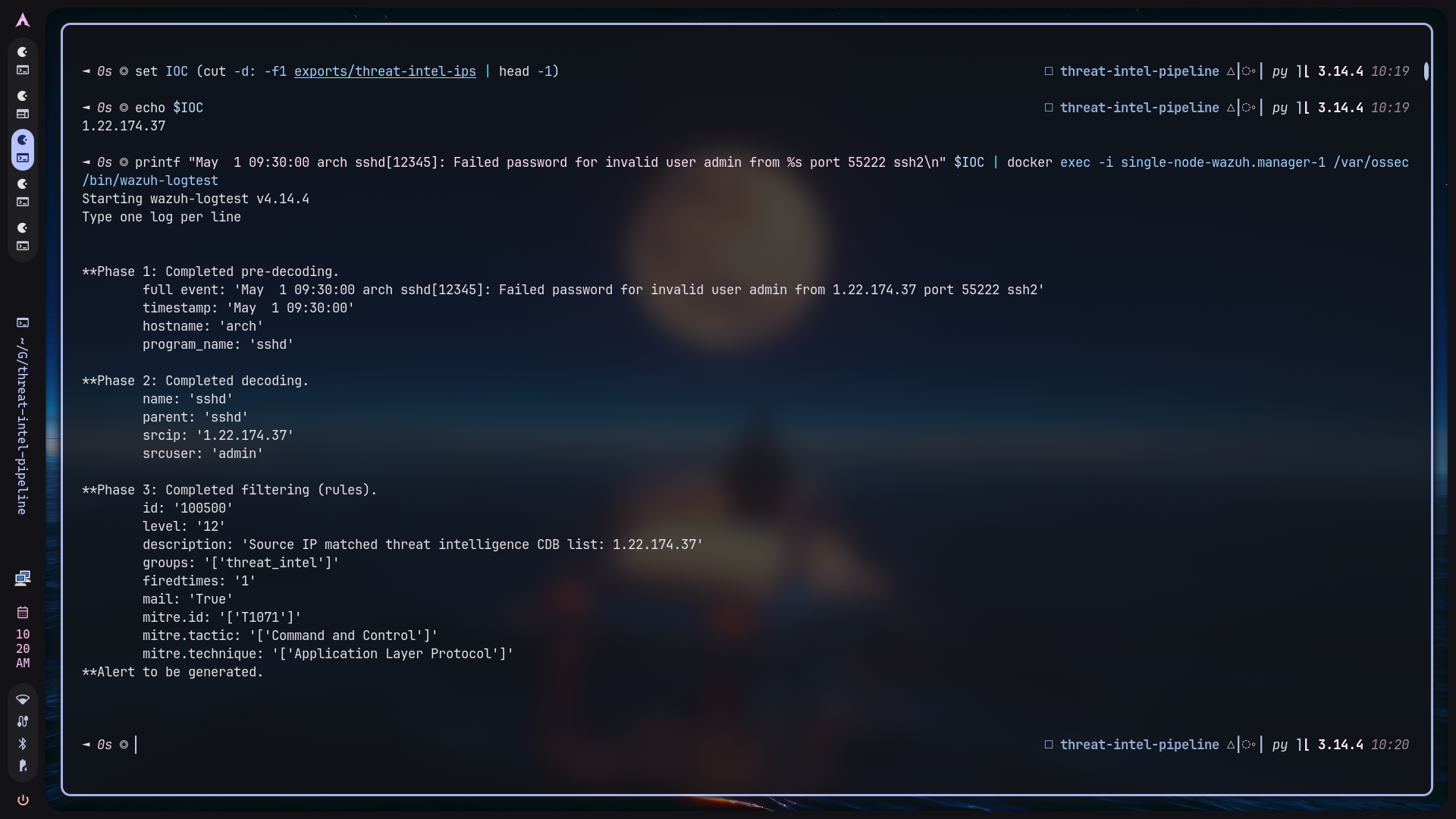
The detection was validated using wazuh-logtest. A synthetic SSH failure log
was generated using an IP from the exported CDB list:
IOC=$(cut -d: -f1 exports/threat-intel-ips | head -1)
printf "May  1 09:30:00 arch sshd[12345]: Failed password for invalid user admin from %s port 55222 ssh2\n" "$IOC" | docker exec -i single-node-wazuh.manager-1 /var/ossec/bin/wazuh-logtest
Wazuh decoded the log, extracted srcip, checked the CDB list, and fired the
custom rule:
id: '100500'
level: '12'
description: 'Source IP matched threat intelligence CDB list: 1.22.174.37'
This is the key proof that the pipeline produces real detection logic, not just static reports.
Dashboard Evidence#
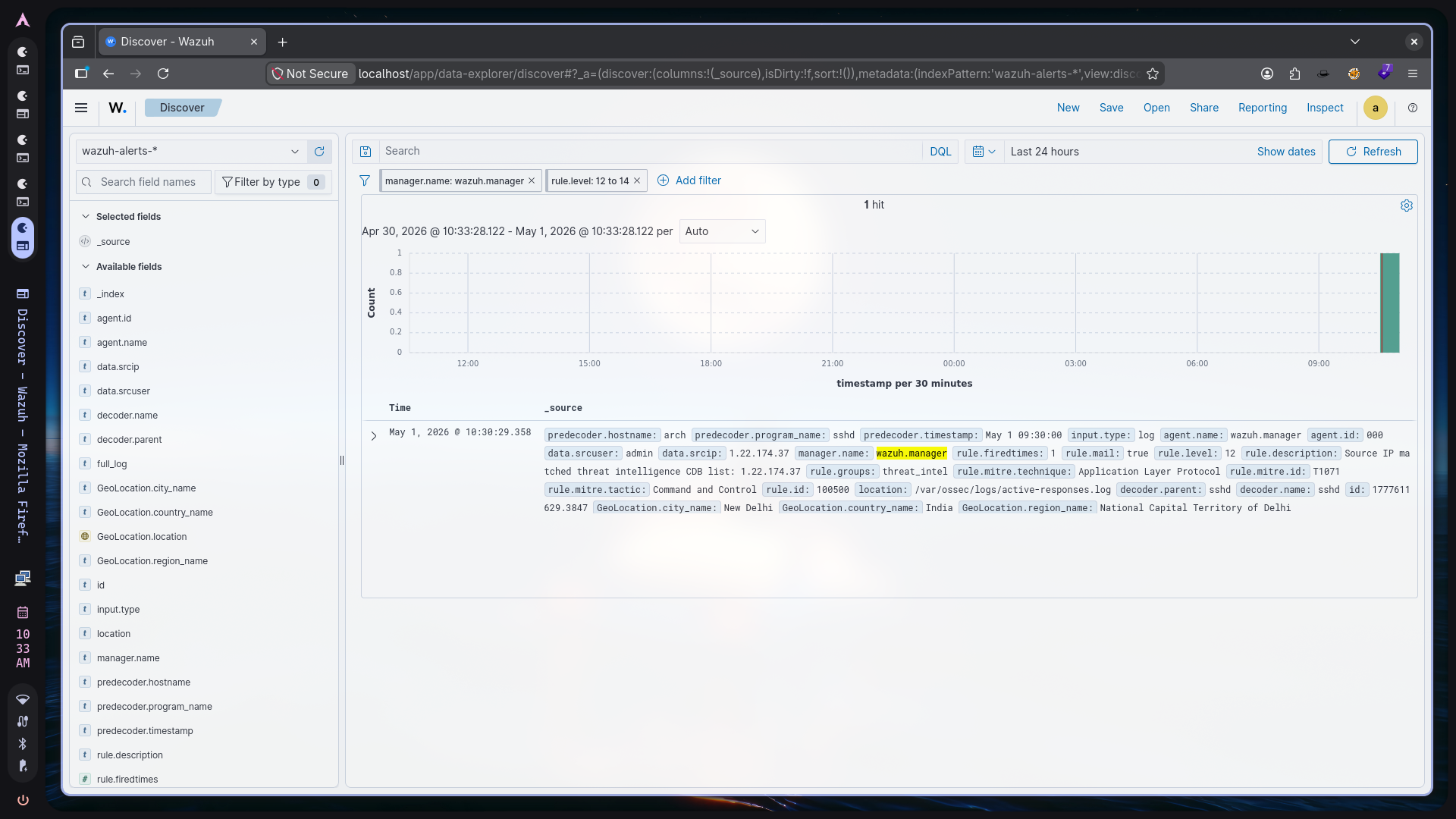
The dashboard screenshot shows the alert visible in Wazuh Discover. This is important because analyst-facing visibility is the final requirement for a useful SIEM integration. The event includes the matched IOC, rule ID, rule level, decoded fields, manager name, and rule description.
In practical terms, this means a SOC analyst could filter on:
rule.id: 100500
and review events where internal telemetry matched the live threat-intel list.
Automation#
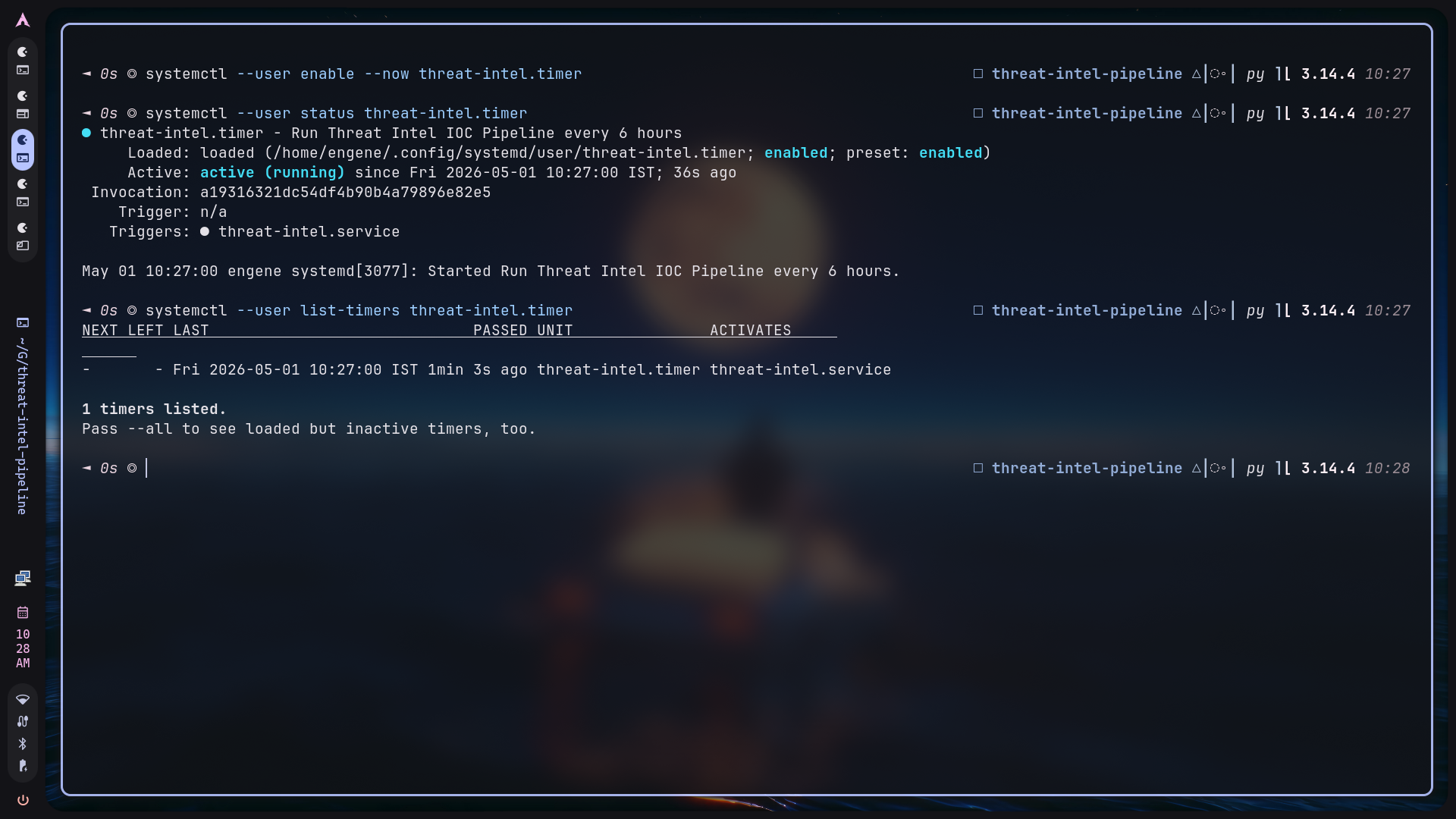
The pipeline is automated with a user-level systemd timer. The timer runs every six hours and triggers the service. This is cleaner than cron on an Arch Linux workstation because systemd provides native status, logs, and failure tracking.
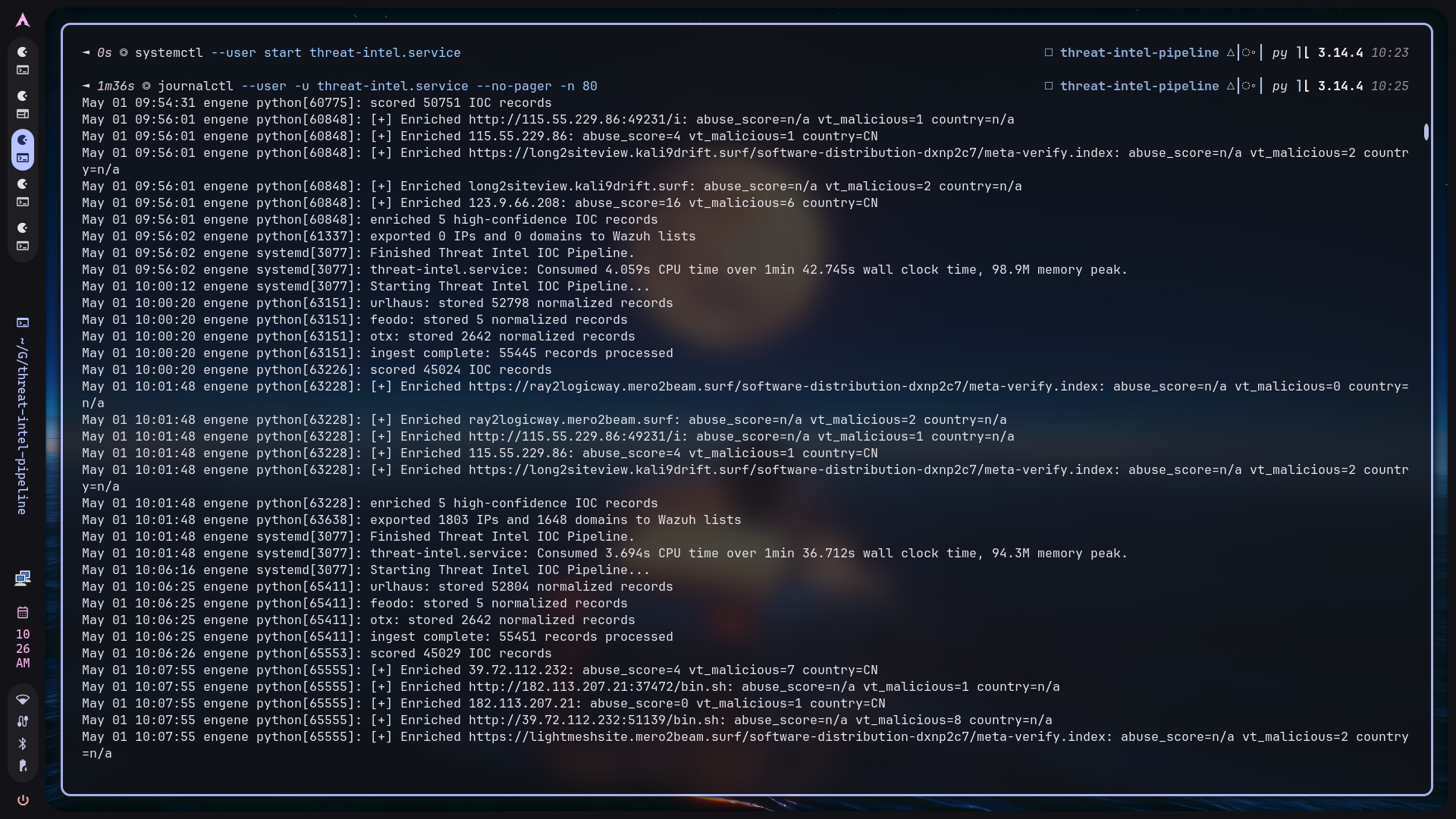
The journal output provides operational evidence that the automated run completed each stage:
- ingestion,
- scoring,
- enrichment sample,
- local Wazuh export.
The timer makes the project behave like a lightweight daemon while still remaining easy to run manually from the CLI.
CLI Workflow#
The pipeline can be operated manually through cli.py:
python cli.py ingest --otx-limit 100 --otx-max-page 5
python cli.py score --verbose --top 5
python cli.py enrich --type ip --limit 5 --verbose
python cli.py export --wazuh --ip-list exports/threat-intel-ips --domain-list exports/threat-intel-domains
python cli.py report --top 20
python cli.py stats
The CLI is intentionally simple. Each command maps to one pipeline stage, making it easy to troubleshoot failures and capture evidence for each phase.
What This Project Demonstrates#
This project demonstrates several practical Blue Team engineering skills:
- CTI feed parsing and normalization.
- SQLite-backed IOC storage and deduplication.
- Confidence scoring and prioritization.
- API enrichment under rate limits.
- Wazuh CDB list generation.
- Custom Wazuh rule development.
- Docker-based Wazuh deployment.
- systemd automation.
- End-to-end detection validation.
The most important result is the final detection chain:
Raw CTI feed -> normalized IOC -> scored IOC -> enriched IOC -> Wazuh CDB list -> custom Wazuh rule -> visible SIEM alert
Limitations#
This is a personal lab project, not a production CTI platform. Current limitations include:
- No distributed queue or worker system.
- No API response cache beyond stored enrichment JSON.
- Limited retry/backoff behavior.
- Simple explainable scoring rather than statistical scoring.
- Wazuh Docker configuration is documented but not fully automated.
- Enrichment depends on free-tier API limits.
These limitations are acceptable for the project goal: demonstrating a complete engineering pipeline from CTI ingestion to SIEM detection.
Future Improvements#
Potential improvements:
- Add unit tests for ingestor normalization and scoring.
- Add structured logging instead of plain
printoutput. - Add API backoff and retry policies.
- Add a
deploy-wazuh-dockerCLI command for container copy/restart steps. - Add enrichment caching and skip recently enriched IOCs.
- Add support for more feeds such as MalwareBazaar, OpenPhish, or ThreatFox.
- Add rule templates for more decoded fields such as DNS queries, proxy URLs, firewall source/destination IPs, and Windows event fields.
- Add a dashboard or HTML report for enriched indicators.
Conclusion#
The project turns open-source CTI into operational Wazuh detections. The engineering value is not just pulling feeds; it is the full chain of normalization, deduplication, scoring, enrichment, export, rule matching, and automation. The final Wazuh alert proves that the pipeline can take an IOC from an external feed and make it visible as a high-severity SIEM event.