🔎 Why Peelr#
When a target already has JavaScript URLs collected, the bottleneck is usually triage, not discovery.
Large frontend bundles often hide the pieces that matter:
- exposed API keys and tokens
- risky DOM sinks
- internal API routes
- sensitive parameters
- hardcoded paths
- comments that reveal implementation details
Peelr is built for that stage. It does not try to be a crawler or a full static-analysis framework. It focuses on reviewing JavaScript sources quickly and surfacing what deserves attention first.
🧠 What It Finds#
Peelr v3 runs its detectors against real JavaScript string literals instead of raw regex lines, which kills the biggest false-positive classes (DOM sinks inside strings, keyboard matching key, division operators read as paths). Placeholder values, dummy passwords, template-interpolated values, and example domains are downgraded or dropped, and only sensitive-named function parameters are reported. Findings are grouped into practical categories:
- API keys and tokens such as AWS, Google, GitHub, Stripe, Slack, Firebase, JWT, PayPal, and SendGrid patterns
- Credentials such as hardcoded passwords, bearer tokens, Basic auth headers, DB connection strings, and private key blocks
- XSS-related sinks including
innerHTML,outerHTML,document.write(),eval(),new Function(),insertAdjacentHTML,srcdoc, anddangerouslySetInnerHTML - Endpoints and request targets from
fetch(),axios, XHR, jQuery AJAX, and literal route references - Parameters, including sensitive names like
token,secret,key,password, andemail - Emails, filesystem paths, relative paths, and S3 references
- Interesting comments such as
TODO,FIXME,HACK, and security-related notes
Each analyzed file also gets:
- a severity and confidence breakdown
- a
0-100risk score - a risk label for quick prioritization
⚙️ Core Workflows#
🖥️ CLI triage#
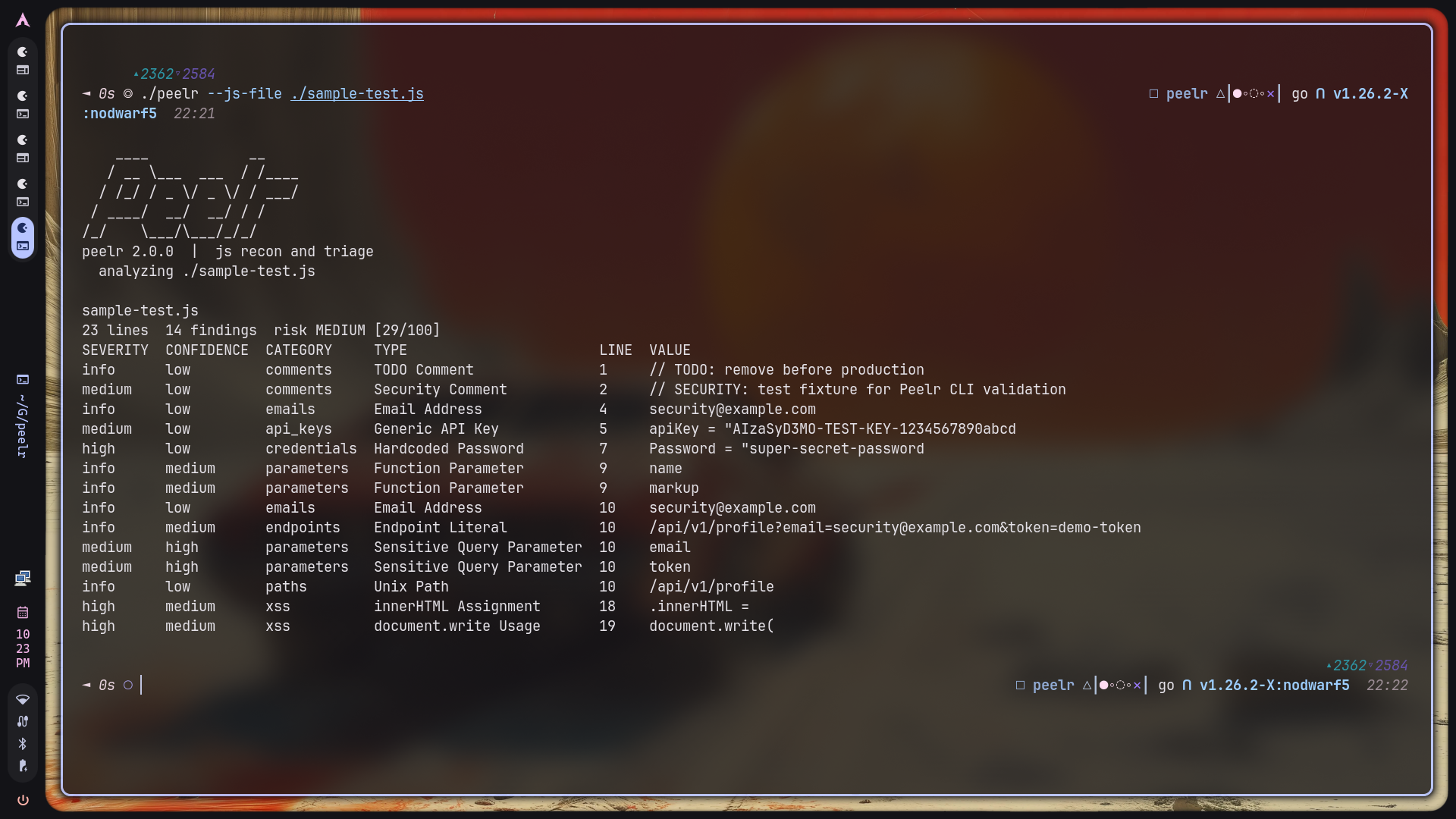
Peelr works well when you want immediate output in the terminal:
./peelr --url https://target.com/app.js
./peelr --file js_urls.txt
./peelr --js-file ./sample-test.js
./peelr --js-file ./dist
It supports:
- remote JavaScript URLs
- local
.jsfiles - directories containing JavaScript
- comma-separated local file paths
- JSON or plain-text output for automation
🌐 Local web UI#
Running Peelr without input starts a local web interface:
./peelr
./peelr --listen 0.0.0.0 --port 9000
Default address:
http://127.0.0.1:8080
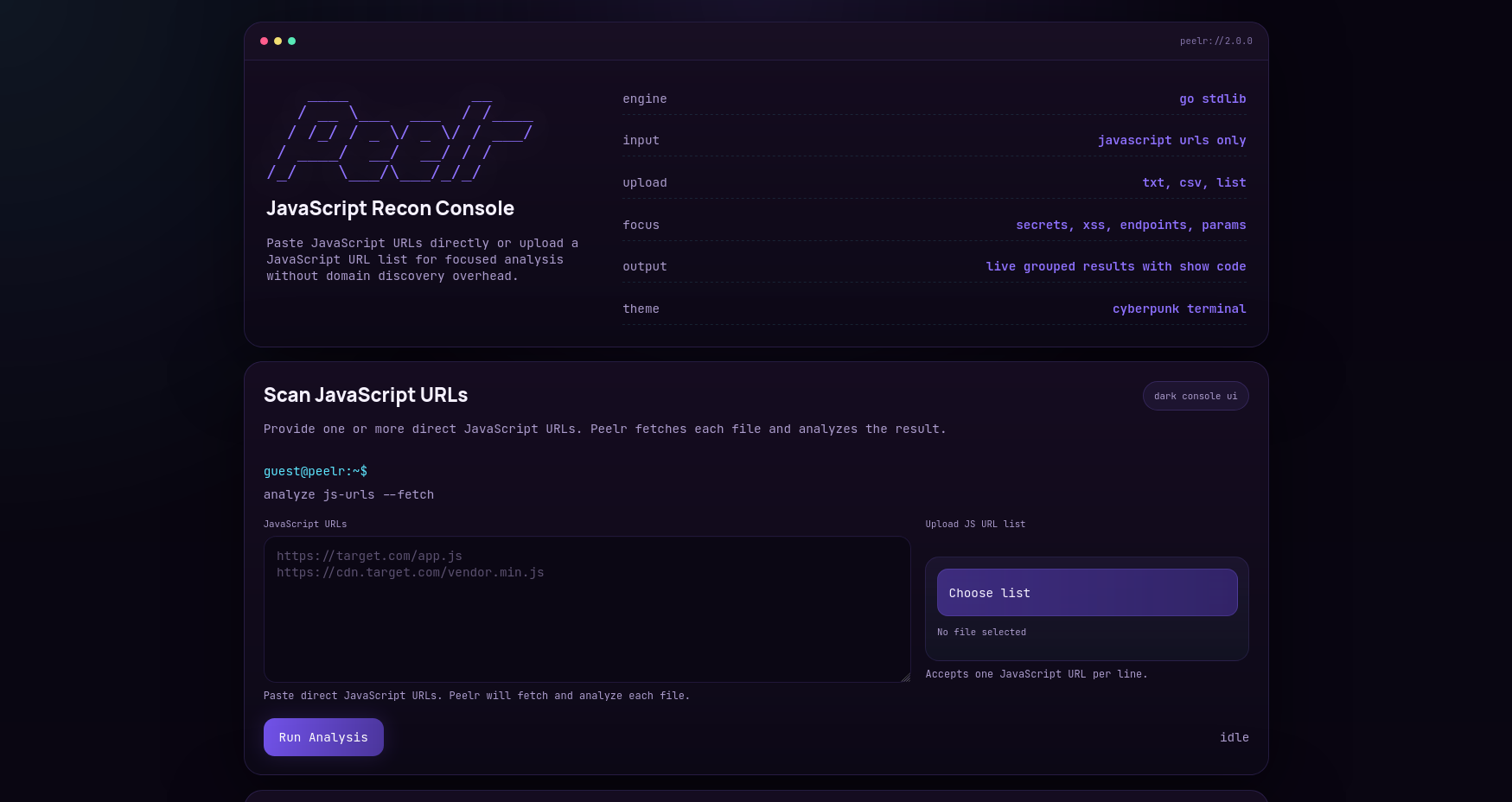
The web UI supports:
- direct URL input
- uploaded files containing URL lists
- live job progress with per-file status
- stats dashboard with files, findings, secrets, and critical/high counts
- category tabs with live counts
- severity filter and debounced search
- finding dismissal (with restore) and JSON/CSV export
- scan history drawer
Here are the current interface views:
🕘 Repeat scans and change tracking#
Peelr stores previous results locally, which makes repeat reviews more practical:
./peelr --history
./peelr --url https://target.com/app.js --diff
./peelr --clear-history
History is stored under:
~/.peelr/history/
🛠️ Installation#
Requirement: Go 1.21+
git clone https://github.com/ibfavas/peelr.git
cd peelr
go build -o peelr ./cmd/peelr
Peelr uses the Go standard library only. There are no third-party runtime dependencies.
📌 CLI Flags#
| Flag | Default | Description |
|---|---|---|
--listen | 127.0.0.1 | Web UI listen address |
--port | 8080 | Web UI port |
--url | - | Single JavaScript URL to analyze |
--file | - | File with one JavaScript URL per line |
--js-file | - | Local JavaScript file, directory, or comma-separated file paths |
--format | table | Output: table, json, plain |
--min-severity | - | Minimum severity for table/plain output: critical, high, medium, low, info |
--diff | false | Compare results with the last stored scan |
--history | false | List stored scan history |
--clear-history | false | Delete saved history |
--workers | 4 | Concurrent workers for URL mode |
--silent | false | Suppress banner and progress output |
--version | false | Print version and exit |
Peelr exits with code 1 when a scan fails or when findings include high or critical severity results, which makes it usable in simple automation flows.
🔌 HTTP Endpoints#
The local web server exposes a small API:
curl -X POST http://127.0.0.1:8080/api/jobs
curl http://127.0.0.1:8080/api/jobs/JOB_ID
curl http://127.0.0.1:8080/api/history
The web job interface accepts up to 250 JavaScript URLs per job.
🗂️ Project Layout#
peelr/
├── cmd/peelr/main.go
├── internal/analyzer/analyzer.go
├── internal/history/history.go
├── internal/server/server.go
├── web/templates/index.html
├── web/static/app.css
└── web/static/app.js
The codebase stays intentionally small:
internal/analyzerhandles detection logic, summaries, and scoringinternal/historymanages saved scans and diffinginternal/serverserves the UI and asynchronous scan jobscmd/peelrties together CLI and web entry points
📏 Practical Limits#
| Limit | Value |
|---|---|
| Maximum JavaScript source size | 20 MB |
| Maximum JavaScript URLs per web job | 250 |
| Default URL worker count | 4 |
| HTTP timeout per remote fetch | 20s |
✅ Takeaway#
Peelr is aimed at the moment after collection, when you need to decide what to inspect first across one or many JavaScript files. It keeps the workflow lightweight, local, and fast while still preserving enough structure to help with repeat scans and triage.
Only use it on systems you own or have explicit permission to assess. 🧅